Cheat Code
curl -v -X GET -H “Authorization: Bearer ey[removed]” -H “Content-Type: application/json” https://graph.microsoft.com:443/v1.0/users?$filter=startswith(displayName,’someone’) –trace-time -v
So I have web API hosted in Azure App Service which returning a result from Microsoft Graph API about some user. This API is somehow bloody slow… it took almost 8 seconds to return result.
I’m puzzled!
I want to know where the heck the slowness came from.
So I spin KUDU from the App Service, and trigger the cheat code.
Here I saw that it took 7.35 secs to connect to graph.microsoft.com from App Service.
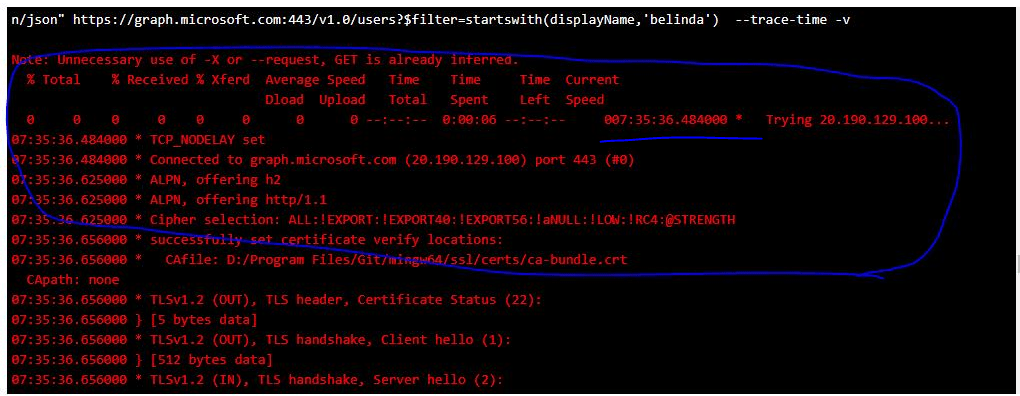
I’m logging ticket to Microsoft Azure support to know WHY!
still puzzled at the moment.

 My IT Cheat Code
Is that problem sloved? I’m facing same issues with createUploadSession(actually most apis are slow), I have my server in OR, it’s not a long distance to ms server.
LikeLike
Yes, we managed to fixed it. It has something to do with Microsoft internal network. Logged ticket with Microsoft team and after couple of days and troubleshooting they solved it.
Basically if you have App Service with VNET integration enabled, some part of “Internet” traffic was routed to internal VNET and the traffic can’t go and reach the destination.
We have no control to update the routing, only Microsoft has.
So reach out to them to fix it.
Have fun cheating!
LikeLike